How Can a Camera Check That Every Assembly Step Was Done in the Right Order?
DBR77 Team · Published
A camera checks assembly steps by recognizing each planned step as it happens and ticking it off on a live checklist. When the order is broken, for example fastener 4 before fastener 3, the technician gets a warning on the tablet while the tool is still in hand. When the work ends with a step missing, the system names that step and sends an image with its position marked. The checklist fills itself from the camera, not by hand.
Counting parts at the end shows whether everything is there, but not in which order it went on. Our article on checking that every fastener is in place covers the count against a reference; this one covers the steps and their order.
Why skipped steps are such a common error
A forgotten step is one of the most ordinary human errors, and it happens in work people know well. The UK Health and Safety Executive lists the omission of a task step among common maintenance failures, next to incorrect reassembly, and adds that even experienced, highly trained, well-motivated technicians can make simple slips and omissions.
Aviation maintenance data shows the same pattern. A review by the Australian Transport Safety Bureau notes that the most common maintenance errors in a Boeing database are omissions: parts not installed and components installed incompletely. In a published case study of complex manual assembly, an omitted operation was the most frequent error mode, with 19 counts, and one of its causes was not applying the required force to fasteners.
After every complaint someone asks whether the step was done, and without a record the answer depends on memory.
Why the order matters as much as the count
On many joints the order of the steps decides the result. A flange is the classic case. The European and US sealing associations state that the sequence in which bolts are tightened has a substantial bearing on the pressure on the gasket, that improper bolting can move the flange out of parallel, and that nuts should be tightened in a cross pattern. A best-practice article by the European Sealing Association goes further: the single most common cause of leakage at bolted flange connections is failure to follow an approved tightening sequence.
In Germany, VDI/VDE 2862 sorts screw joints into risk categories A, B and C, from danger to life and limb down to non-critical, and each category has its own minimum requirements for the fastening process.
A final inspection cannot see the order. Once the last bolt is in, a flange tightened in the wrong sequence looks the same as one tightened correctly, until it leaks or fails the pressure test.
How a camera follows the work instruction
The camera compares what happens at the station with the planned sequence and reacts at three moments:
- Each planned step is recognized. When the technician fits fastener 1, the camera confirms it and ticks the step off on the live checklist on the tablet.
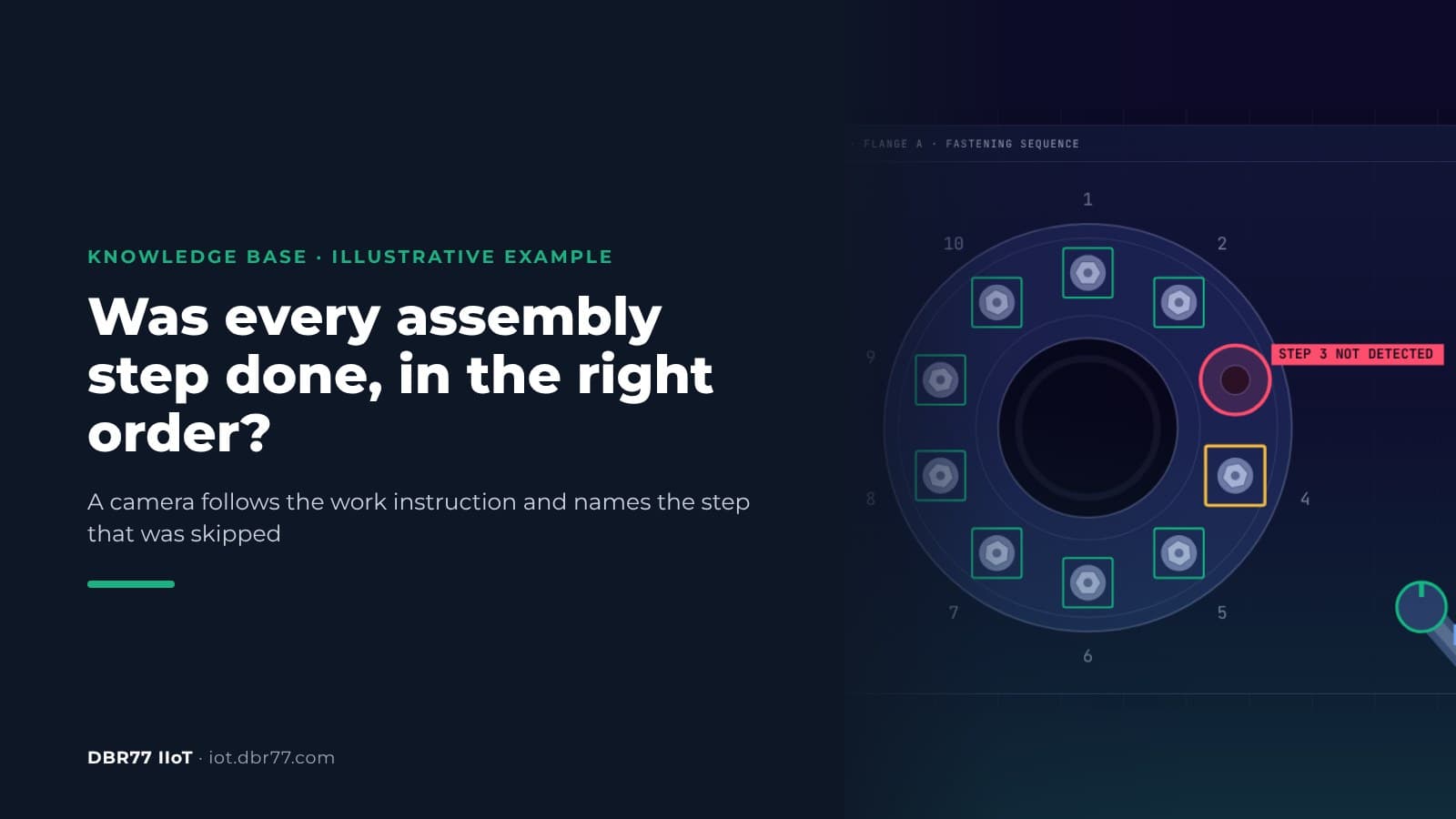
- A step out of order triggers a warning at once. If fastener 4 comes before fastener 3, the tablet shows "Sequence deviation: fastener 4 before fastener 3" while the tool is still in the technician's hand.
- A missing step is named at the end. If the work finishes with 9 of 10 steps, the system reports "Step 3 not identified" and sends the technician an image with position 3 marked.
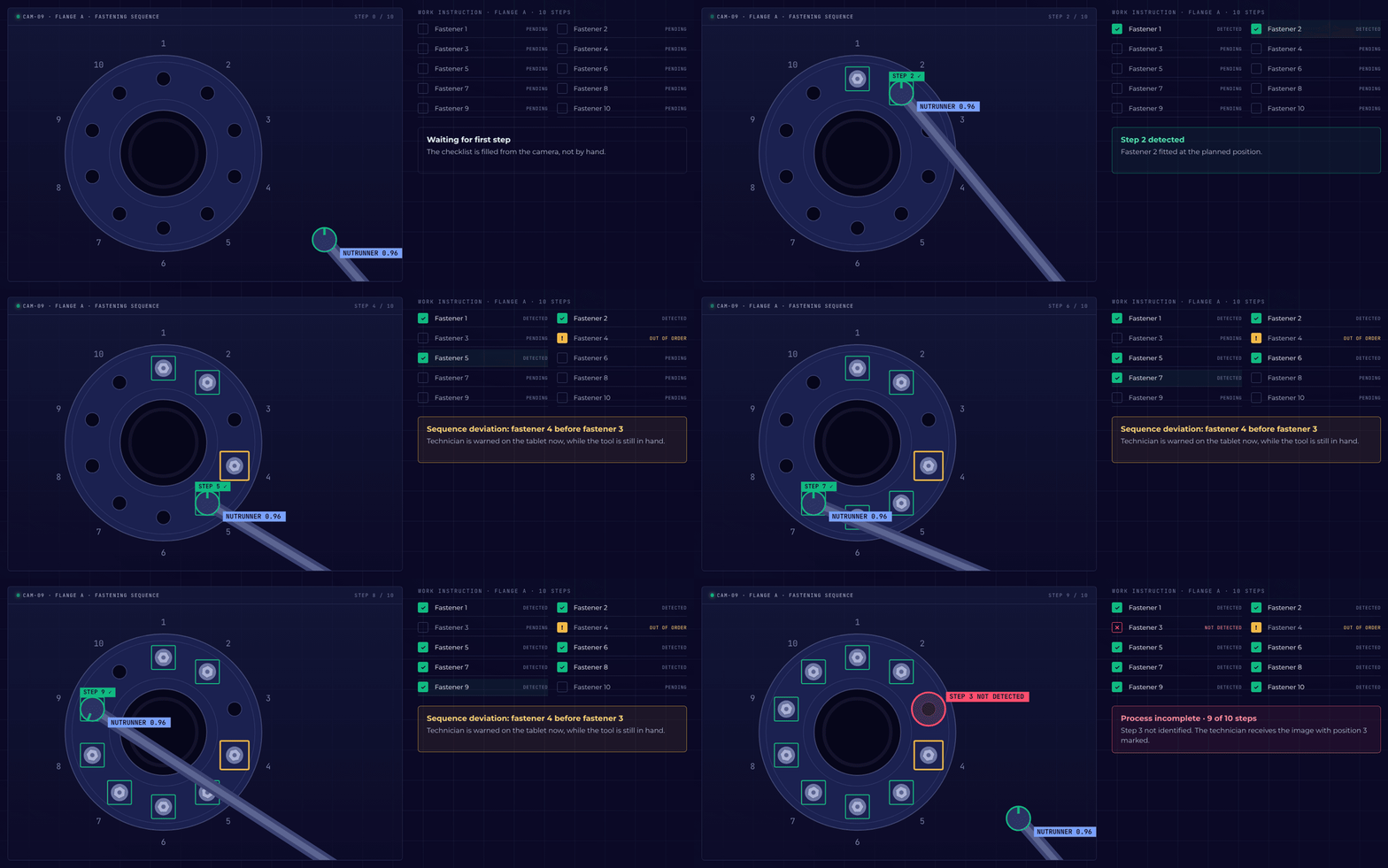
Illustrative example from the DBR77 Vision AI presentation: step 3 is skipped, the order warning appears at once and the missing step is named at the end.
In the example the technician uses a nutrunner on one flange with ten fasteners. The planned order can be a simple sequence or a cross pattern, as when tightening flanges.
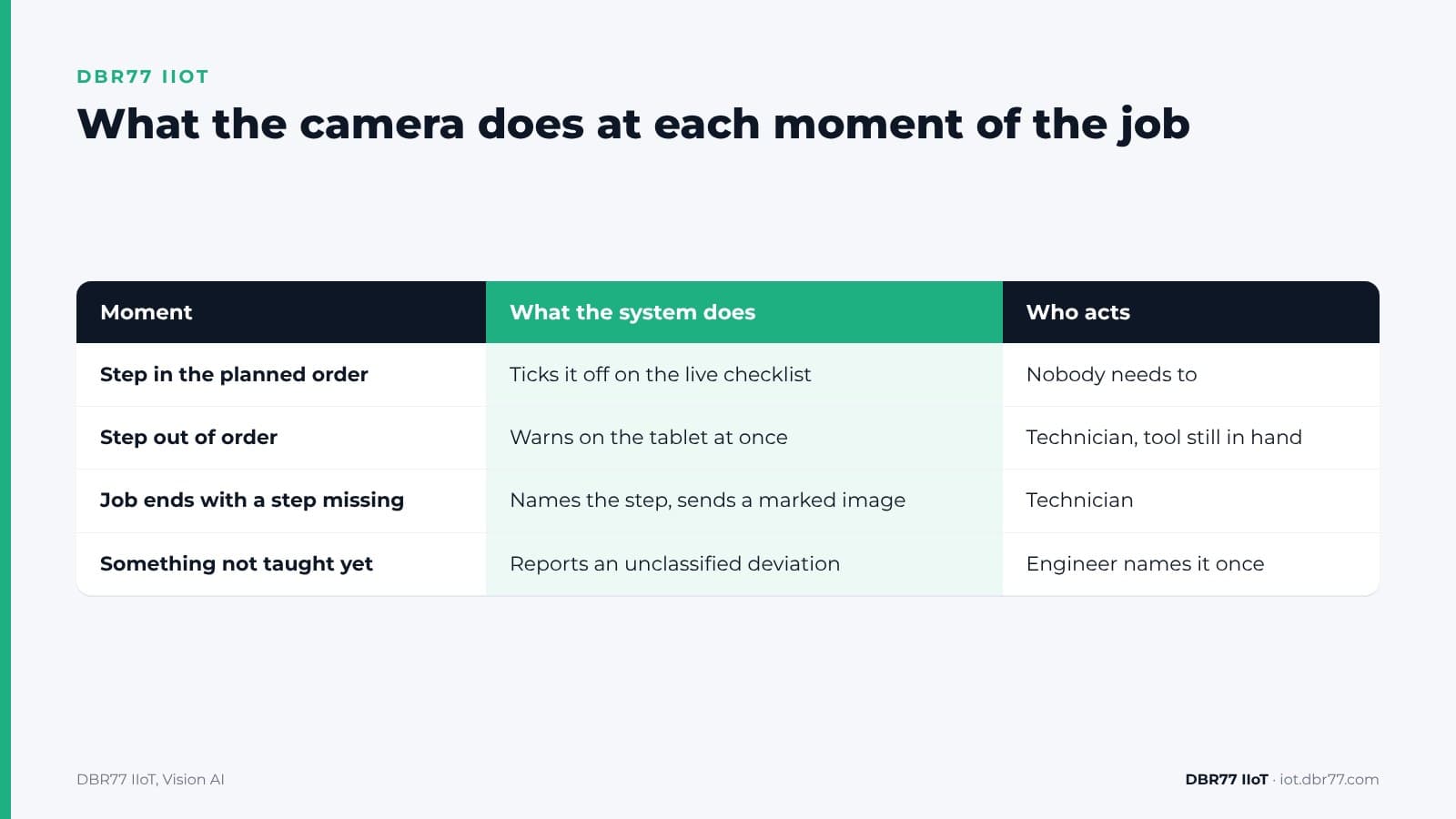
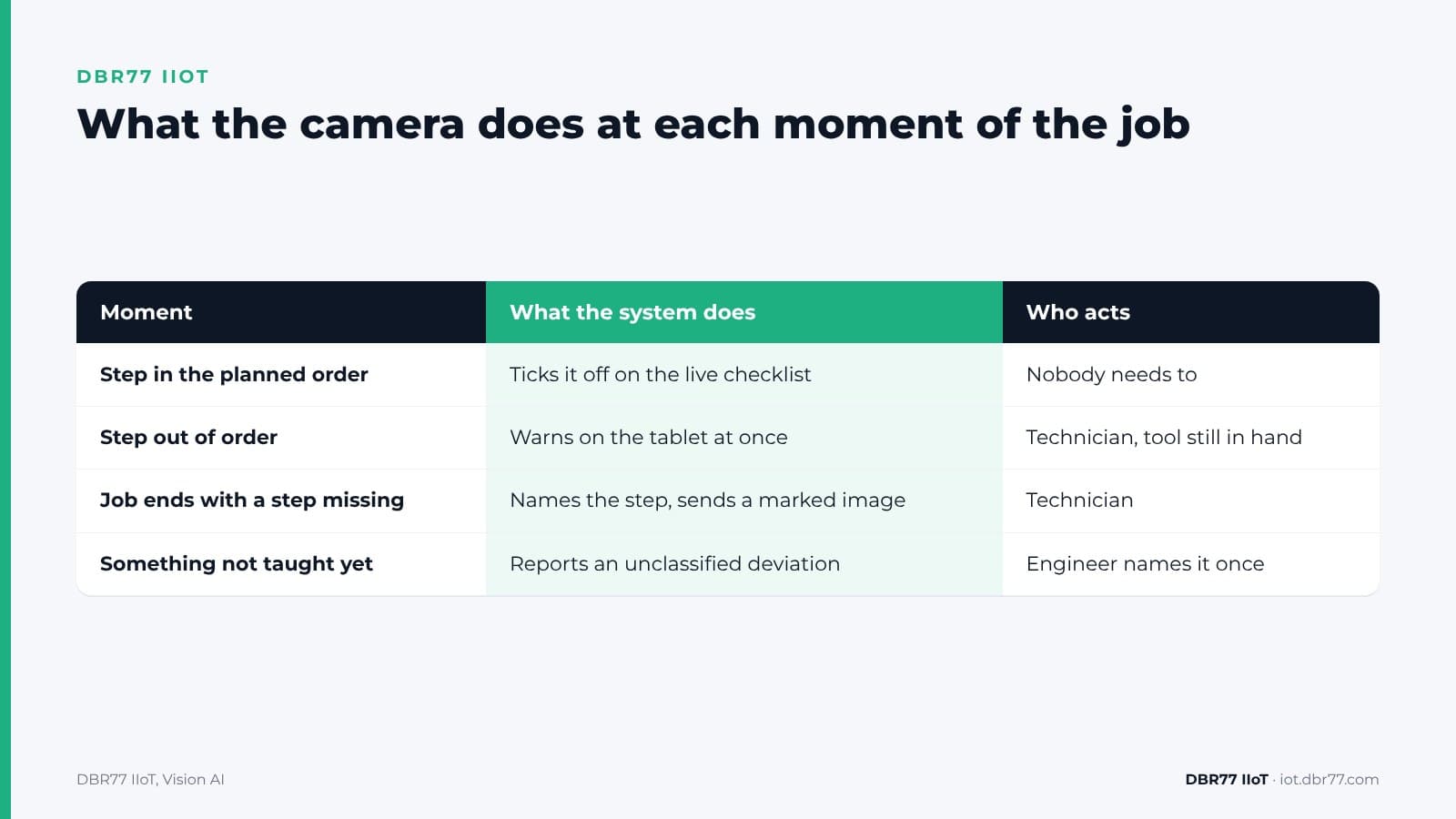
| Moment | What the system does | Who acts |
|---|---|---|
| Step done in the planned order | Ticks it off on the live checklist and logs it | Nobody needs to |
| Step done out of order | Warns on the tablet at once | The technician, while the tool is still in hand |
| Work finished with a step missing | Names the missing step and sends an image with its position marked | The technician |
| Something the system was not taught | Reports a deviation not yet classified; an engineer names it once and it becomes a new category | The engineer |
ASQ lists this as one of the classic mistake-proofing methods: the sequencing method checks the process sequence to make sure steps are done in order, and warning signals alert the worker that an error has occurred. The camera applies that method without a switch on every tool.
Test a sequence check on your own station
Send us one or two short videos of the work and the work instruction. We show you which steps the system recognizes and which it misses.
What you need to set up a sequence check
A sequence check needs three things: a written work instruction, a camera that sees the work area, and a few examples of the work done right.
- The work instruction is the reference. Your work instruction fixes the sequence in which the operator performs the tasks. If your instruction does not fix the order, decide it before you set up the camera.
- The camera must see each step. In DBR77 IIoT, the camera layer is Vision AI. Any standard IP camera can be used, and each image is analyzed in about 25 ms on a computer inside your building.
- Steps are described in words. An engineer types what to look for and marks a few examples as OK or NOK. There is no dataset to collect and no separate training project.
- You set the reaction. Count, log, warn or notify a person, without programming.
The test follows the same path as any Vision AI check: a demo and a look at your station, a test on a few photos and short videos under NDA, a proof of concept on one station, and a rollout only if the results convince you. Our guide on going from one successful pilot to a plant standard covers that last step.
Where a camera stops and other checks take over
A camera confirms that a step happened and in which order. It does not replace the other checks around the joint:
- Torque. The camera sees that the nutrunner was used on position 4. The torque value comes from the tool and its records. For safety-critical joints in category A, VDI/VDE 2862 calls for full tightening data, and Atlas Copco's whitepaper on the guideline adds that automated error detection may be used in addition to documenting the data. A camera adds that kind of layer next to the tool data.
- Hidden steps. A step done behind a cover, inside a housing or under the technician's hands cannot be confirmed. A different camera position or a second camera can cover some of these; we test camera variants on the station before choosing one.
- The decision. Vision AI warns and reports, and a person decides what happens next. It does not stop the line or the tool.
- Safety functions. Vision AI is not a certified safety system. Machine safety stays with the systems designed for it.
How warnings reach people matters as much as the check itself. Our article on why machine alerts fail on the shop floor covers that, and the article on what to do when operators do not trust the signals yet covers the first weeks of a new check.
Where this sits in DBR77 IIoT
Vision AI is the camera layer of DBR77 IIoT. The tablets at the stations already guide operators through complex processes step by step; the camera adds the confirmation that each step was actually done.
- Our devices only read. They never send commands to your machines and do not change the control system.
- Images are analyzed on site and video is not recorded. The technician receives one still image with the position marked.
- Vision AI runs on DBR77 Vector, our own industrial AI, which can be deployed on your servers. Your data trains no model without written consent, and DBR77 is certified to ISO/IEC 27001:2022.
- Vision AI events land in IRIS. For how quality issues connect with production and maintenance there, see the IRIS article on how to link quality issues to production and maintenance.
FAQ
Can the camera tell which step was skipped?
Yes. When the work ends with a step missing, the system names the step, for example "Step 3 not identified", and sends the technician an image with that position marked.
Does the technician have to confirm each step on the tablet?
No. The checklist is filled from the camera, not by hand. The technician sees each step ticked off as the work goes on.
What if our order is a cross pattern, not 1 to 10?
The planned order is whatever your work instruction says. A cross pattern for flange bolts works the same way as a simple sequence: each step is checked against the planned position and order.
Does a sequence warning stop the tool?
No. Vision AI warns the technician and logs the event. Stopping the tool or the line is a decision for a person.
Does the camera record the technician?
No video is recorded. Images are analyzed on a computer inside your building, and the technician receives one still image of the work area with the position marked. Check your local rules on workplace cameras and inform employees before the first camera is installed.
Conclusion
Pick one job where the order matters and a skipped step has already cost you: a flange that leaked, a cover refitted without one of its screws, a rework that came back. This week, film the job twice from where a camera could hang, once done right and once with a step skipped on a test part, and note the order from your work instruction. That is enough for a first test of whether a camera can follow the steps on your station.
Bring one job with a fixed sequence to the demo
Show us the work instruction and a short video of the job. We show you a sequence check on a similar example and what it would need on your station.
Sources
- HSE, Maintenance error
- A. Hobbs, Australian Transport Safety Bureau, An Overview of Human Factors in Aviation Maintenance, 2008
- Torres, Nadeau, Landau, Classification and Quantification of Human Error in Manufacturing: A Case Study in Complex Manual Assembly, Applied Sciences, 2021
- ESA and FSA, Guidelines for safe seal usage: Flanges and Gaskets, 1998
- European Sealing Association (R. Wacker), Primary flange forces, Part 2, republished by Spetech
- VDI/VDE, 2862 Part 2: Minimum requirements for application of fastening systems and tools (contents), 2015
- Atlas Copco, Whitepaper on VDI/VDE 2862 Part 2, 2023
- ASQ, What is Poka-Yoke? Mistake and Error Proofing
- DBR77, DBR77 IIoT, 2026
- DBR77, IIoT and Vision AI customer presentation, 2026