How Can a Camera Check That Every Fastener Is in Place?
DBR77 Team · Published
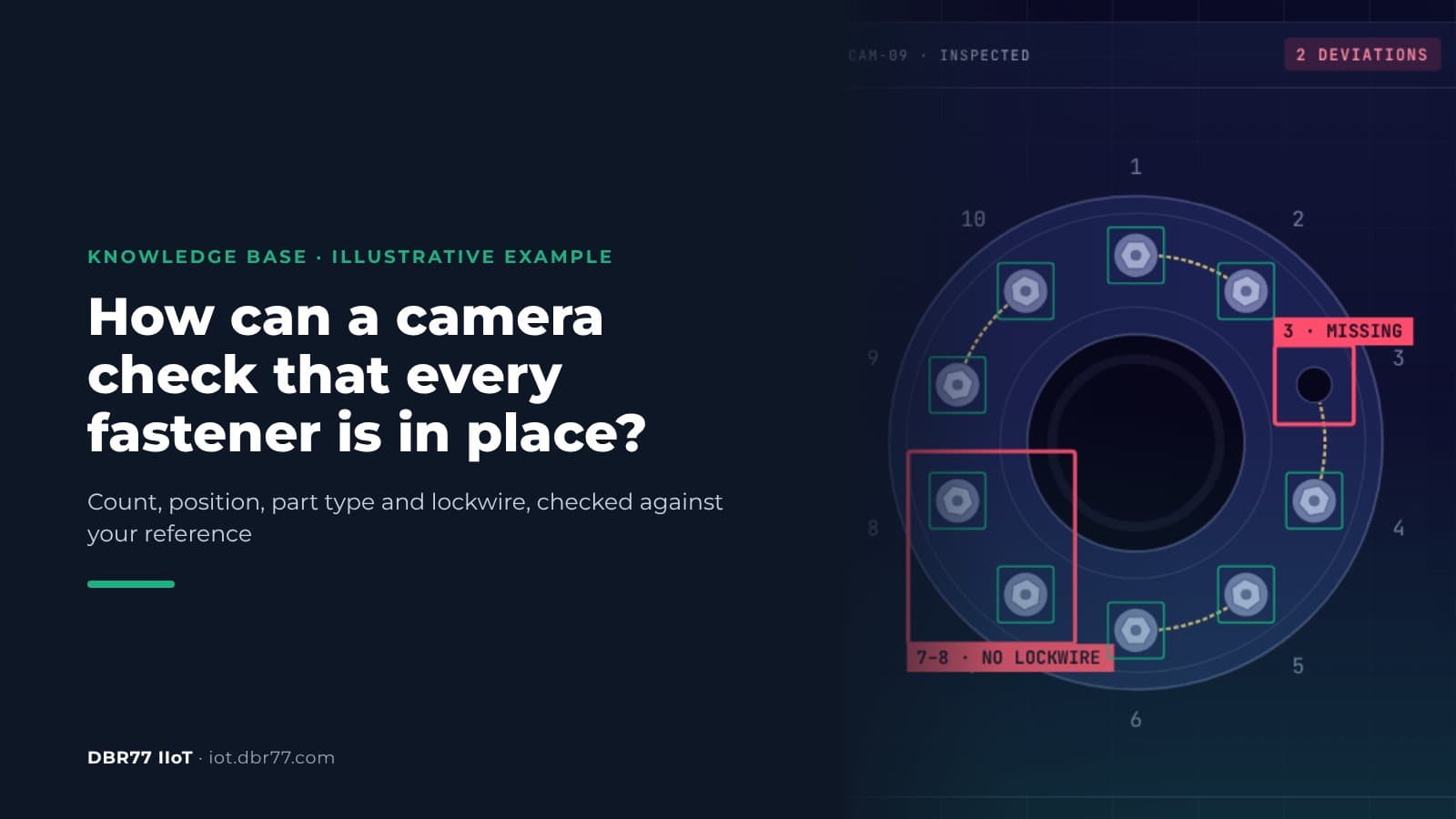
A camera checks fasteners by comparing every finished assembly with an approved reference: it counts the fasteners, checks each position, the part type and orientation, and looks for lockwire, seals and connectors. When something differs, the technician gets an image with the deviating area marked, at the station. A camera cannot measure torque or see a fastener hidden under another part, so those checks stay with the tool and the process.
Plants are buying more machine vision. In North America, machine vision transactions grew 8.8% year over year in the second quarter of 2026, and VDMA expects Europe's machine vision industry to grow by 3% in 2026. This article covers one job inside that market, a question we hear from assembly and maintenance teams: did every fastener end up where the drawing says?
Why a missing fastener gets past a careful inspector
Visual inspection is repetitive, and even trained inspectors miss defects. In a Sandia National Laboratories study, 82 inspectors checked 140 parts for eight defect types. They correctly rejected 85% of defective items and incorrectly rejected 35% of acceptable parts, and the authors noted that this was not much better than the industry average of 80%.
Locking features are a standard inspection item. The FAA reminds mechanics that safety wire is needed where a bolt could loosen under vibration. NASA's fastener standard requires that the presence of locking features is verified, and for mechanical ones it names visual inspection after installation as the method.
Rework adds risk, because a part that is opened again is no longer covered by its original check. In its investigation of Alaska Airlines flight 1282, the NTSB found that the four bolts needed to secure the door plug were missing before the accident, and that without documentation of the work, no quality assurance inspection of the plug closure took place. Few plants carry stakes like that, but the lesson carries over: work done after the original inspection needs its own check.
How a reference check works
A reference check has three steps: you tell the system what to look for, you show it what good looks like, and you decide what happens when the result differs. In DBR77 IIoT the camera layer is called Vision AI, and it works like this:
- Describe the scene in words. An engineer types what the camera should look for, for example "fasteners on flange A". There is no dataset to collect and no separate training project.
- Mark a few parts as OK or NOK. The approved assembly becomes the reference. In the example, OK means "10 of 10 fitted, lockwired" and NOK means "missing or wrong fastener".
- Set the rule and the reaction. Count, log, warn or notify a person, without programming.
From then on, every image is compared with what the system was taught. Each image is analyzed in about 25 ms on a computer inside your building, and any standard IP camera can be used.
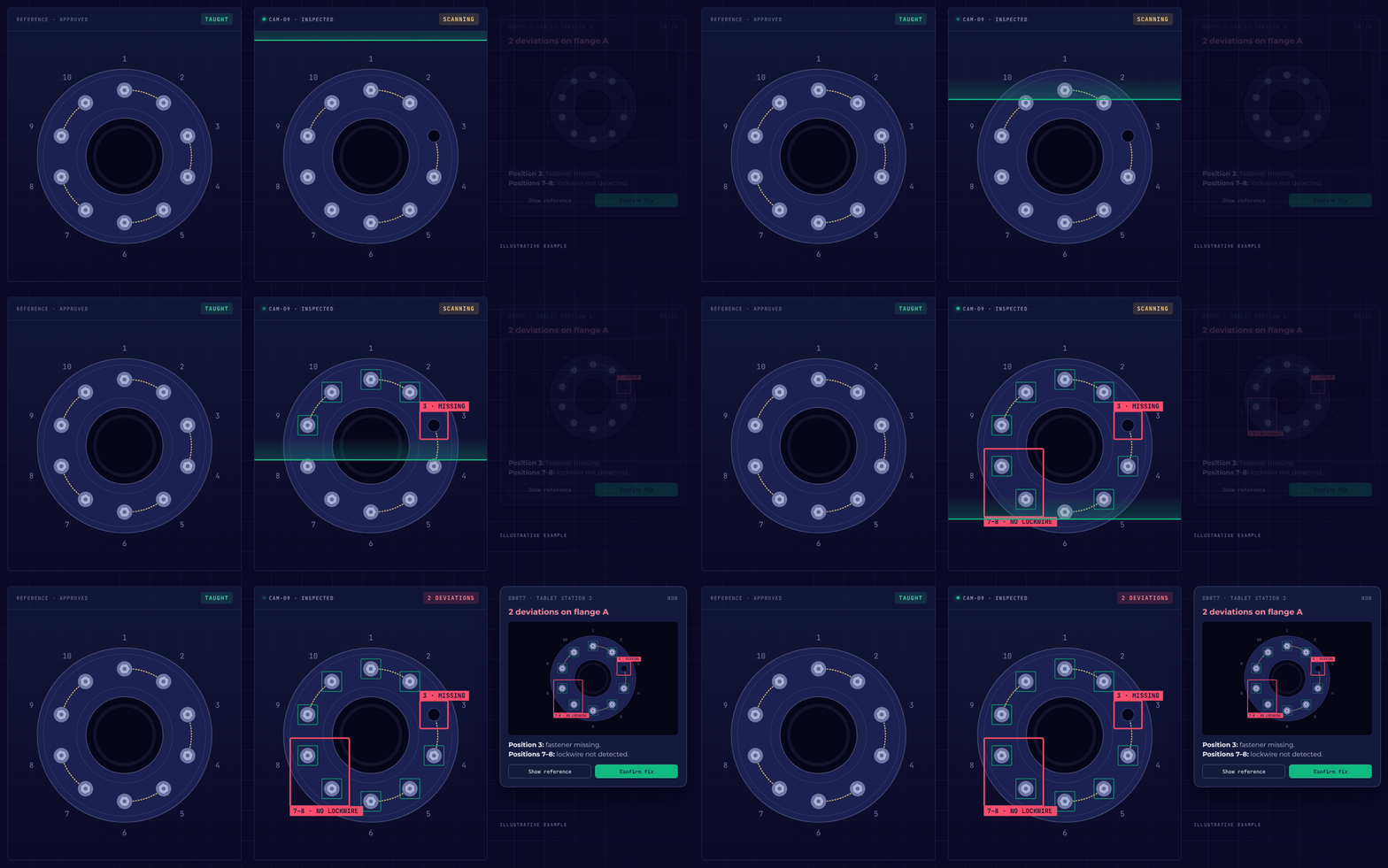
Illustrative example from the DBR77 Vision AI presentation: the scan marks a missing fastener at position 3 and missing lockwire at positions 7 and 8.
The animation is an illustrative example with one flange and ten fasteners. The scan finds that position 3 has no fastener and that the lockwire between positions 7 and 8 is not detected, and the tablet at the station shows both on the image of the flange.
Whether a camera is the right data source for a station at all is covered in our article on cameras as sensors.
Test a reference check on your own part
Bring a few photos of a good assembly and one with a deviation. We show you what the system finds and what it misses.
What a camera can confirm, and what needs another tool
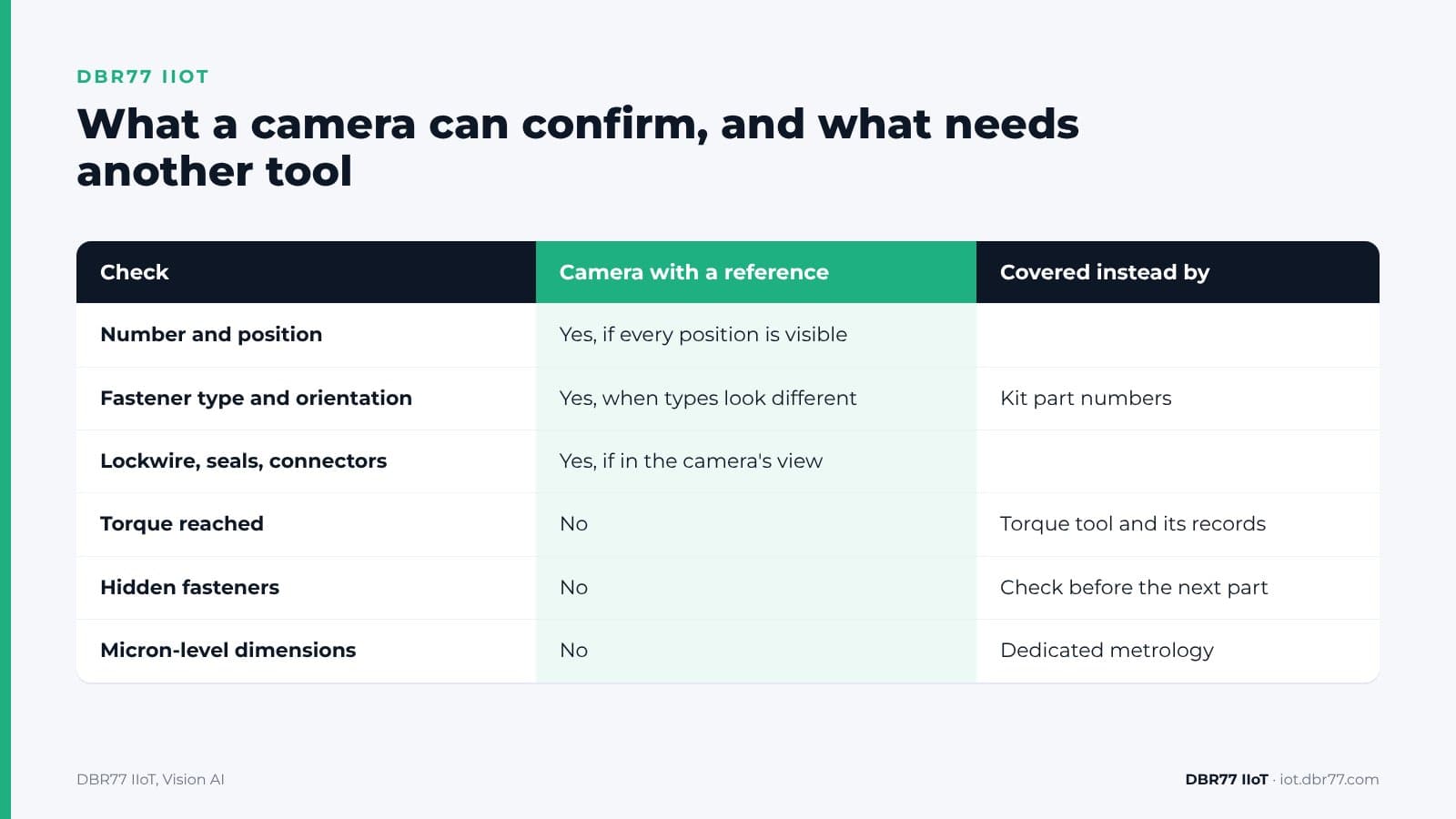
A camera confirms what it can see from where it is mounted: count, position, part type, orientation and visible locking features. Anything hidden, inside the thread or below the visible tolerance needs a different check.
| Check | Camera with a reference | What covers it instead |
|---|---|---|
| Number and position of fasteners | Yes, if every position is visible | |
| Correct fastener type and orientation | Yes, when the types look different | Part numbers in the kit for look-alike parts |
| Lockwire, seals, connectors present | Yes, if they are in the camera's view | |
| Steps done in the planned order | Yes, with a camera on the work area | |
| Torque reached | No | The torque tool and its records |
| Fasteners hidden under another part | No | A check before the next part goes on |
| Micron-level dimensions | No | Dedicated metrology |
| Machine guarding, stopping a robot for safety | No | A certified safety system |
The rows on micron-level dimensions and machine guarding are stated on our product page as well: for micron-level measurement, use dedicated metrology, and Vision AI should not be treated as a certified safety system.
Camera position decides most of the result. If the tool or a cable covers a fastener when the image is taken, the camera cannot confirm it. In a test we try several camera variants on the station and choose the one that sees every position, instead of committing to one camera up front.
What happens when the camera finds a deviation
When the camera finds a deviation, it runs the reaction you set and sends the technician an image with the area marked. Every scene in Vision AI has three possible outcomes:
- Desired result. The system counts and logs it. After 10 of 10 fasteners are confirmed, for example, it can trigger the next action you set.
- Undesired result. The system warns, logs and notifies a person, for example "Wrong fastener type at position 4", with an image of position 4. The person decides what happens next.
- Deviation not yet classified. Something unusual is on the part. An engineer names it once, it becomes a new category, and next time it is recognized and handled automatically.
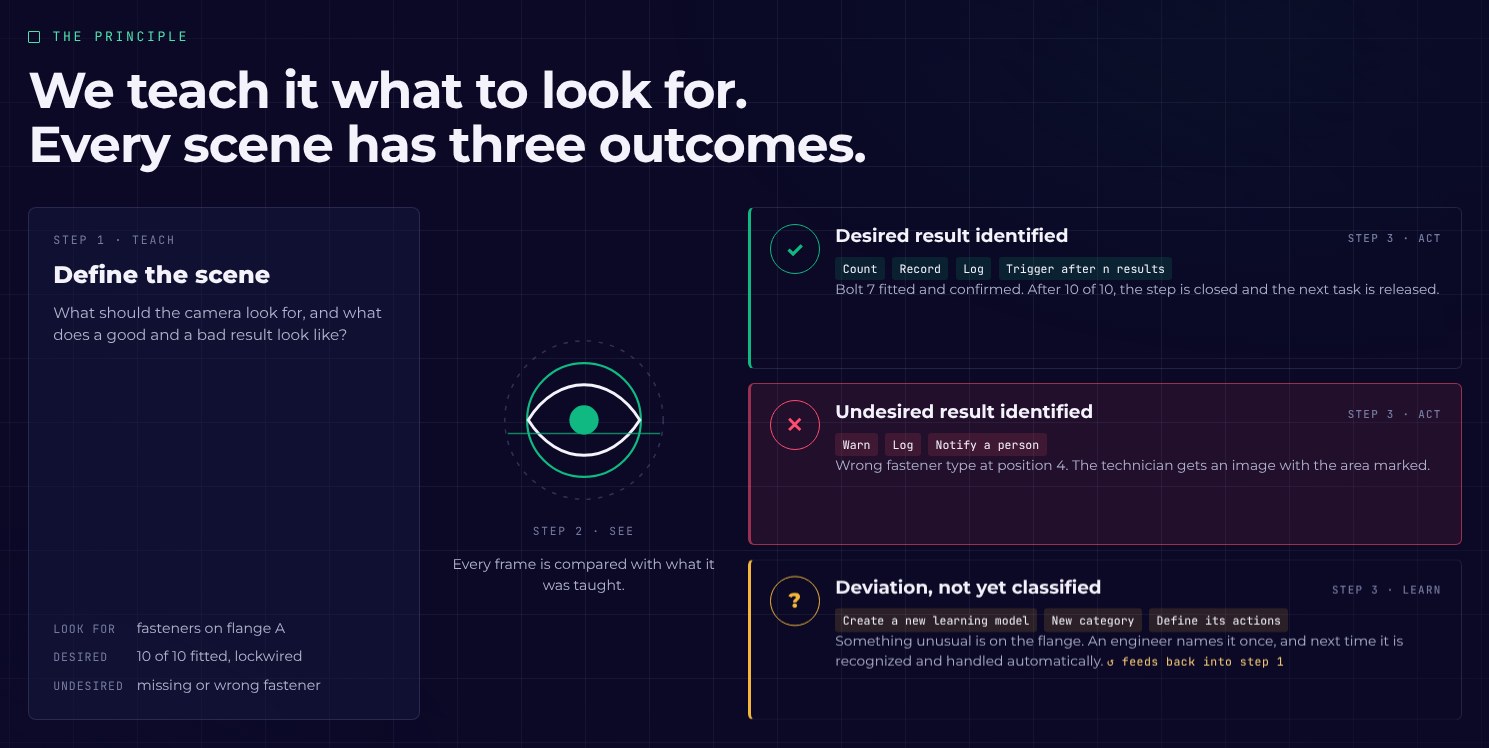
From the DBR77 Vision AI presentation: every scene has three outcomes. A deviation goes to a person, who decides what happens next.
A camera count against a reference is a form of error proofing. ASQ describes poka-yoke as a method that makes an error immediately obvious once it has occurred, and one of the methods it lists counts parts to make sure an item is complete. The camera does that count at the station.
The place where the deviation is found sets the cost. ASQ separates internal failure costs, for defects found before delivery, from external failure costs, for defects the customer finds. A missing fastener found at the station means rework at the station. Found by a customer, it becomes a complaint and often a containment action.
A message that only says "NOK" sends the technician searching, while a photo with position 3 marked shows them where to go. Who gets the alert, on which device, and what they confirm is covered in our article on why machine alerts fail on the shop floor. For linking these events to quality records, see the IRIS article on how to link quality issues to production and maintenance.
How to test it on your own station
A test runs in four steps, and you can stop after any of them:
- Demo and use case. We look at the station together: the steps, the fasteners and what a deviation looks like.
- Test on your material. You send a few photos and one or two short videos of the station, taken by your staff under your photo policy. We sign an NDA first and show you what the system finds and what it misses.
- Proof of concept on one station. We install, fine-tune on site and measure the result on the station you choose.
- Rollout. When the results convince you, the check goes to every station where it fits.
The cost has four parts: the edge unit, the AI chip, a monthly software license per hardware unit, and the cameras. The chip depends on how many cameras one unit serves, the image resolution and frame rate, and how complex the check is. One unit can evaluate 1 to 40 cameras in parallel. Cameras range from the ones you already have to special X-ray or laser systems, depending on what the check has to see.
If you are still choosing where to start, our guide on how to choose the first use case helps rank the candidates.
Where this sits in DBR77 IIoT
Vision AI is the camera layer of DBR77 IIoT, next to MasterHub for machine signals and the Status Deck and tablets for operators. It follows the same rules as the rest of the system:
- Our devices only read. They never send commands to your machines and do not change the control system. Vision AI does not stop a machine: that decision stays with a person.
- Images are analyzed on site and video is not recorded. What leaves the analysis is an event, with the image of the marked area for the technician. Our article on edge vs cloud in manufacturing explains why that split matters.
- Vision AI runs on DBR77 Vector, our own industrial AI, which can be deployed on your servers. Your data trains no model without written consent, and DBR77 is certified to ISO/IEC 27001:2022.
- Each result becomes an event that lands in IRIS together with machine data.
FAQ
Can a camera check that a bolt is tightened to the right torque?
No. A camera sees that a fastener is present, in the right position and of the right type, but torque is not visible. Torque comes from the tightening tool and its records. If a camera sees the work area, a second type of check can confirm that the planned steps were done in order.
Do we need a large training dataset?
No. You describe in words what the camera should look for and mark a few parts as OK or NOK. The approved assembly becomes the reference, and engineers can add new checks during operation.
What if a fastener is hidden by the part, the tool or a hand?
Then the camera cannot confirm it at that moment. The fix is camera position and timing: check before the next part covers the fastener, or add a second camera. We test several camera variants on your station before choosing one.
Does the camera record our technicians?
No video is recorded. Images are analyzed on a computer inside your building. The output is an event, such as "2 deviations on flange A", with the image of the part. Check your local rules on workplace cameras and inform employees before the first camera goes up.
Can it check that the steps were done in the right order?
Yes. A second type of check recognizes each planned step, warns when the order is not kept and names the missing step. We cover it in a separate article.
Conclusion
Pick one assembly where a missing fastener, lockwire or connector has caused rework or a complaint. This week, take a few photos of a good assembly, a few of a known deviation and one short video of the work, from an angle a camera could have on the station. That is all a first test needs, and it shows which positions a reference check can confirm and which checks stay with the tool and the process.
Bring one station to the demo
Show us the assembly and what a deviation looks like. We show you a reference check on an example like yours and what it would need on your station.
Sources
- J. E. See, Sandia National Laboratories, Visual Inspection Reliability for Precision Manufactured Parts, Human Factors, 2015
- FAA Safety Team, Safety Wire, fact sheet AFS-850 20-05
- NASA, NASA-STD-5020B Requirements for Threaded Fastening Systems in Spaceflight Hardware, 2021
- NTSB, Alaska Airlines flight 1282 door plug investigation, press release, 2025
- ASQ, What is Poka-Yoke? Mistake and Error Proofing
- ASQ, What is Cost of Quality (COQ)?
- A3, Vision and Imaging Statistics, 2026
- VDMA Machine Vision, Machine Vision Industry Shows Upward Trend, 2026
- DBR77, DBR77 IIoT, 2026
- DBR77, IIoT and Vision AI customer presentation, 2026