How Can a Camera Warn People Who Get Too Close to a Robot?
DBR77 Team · Published
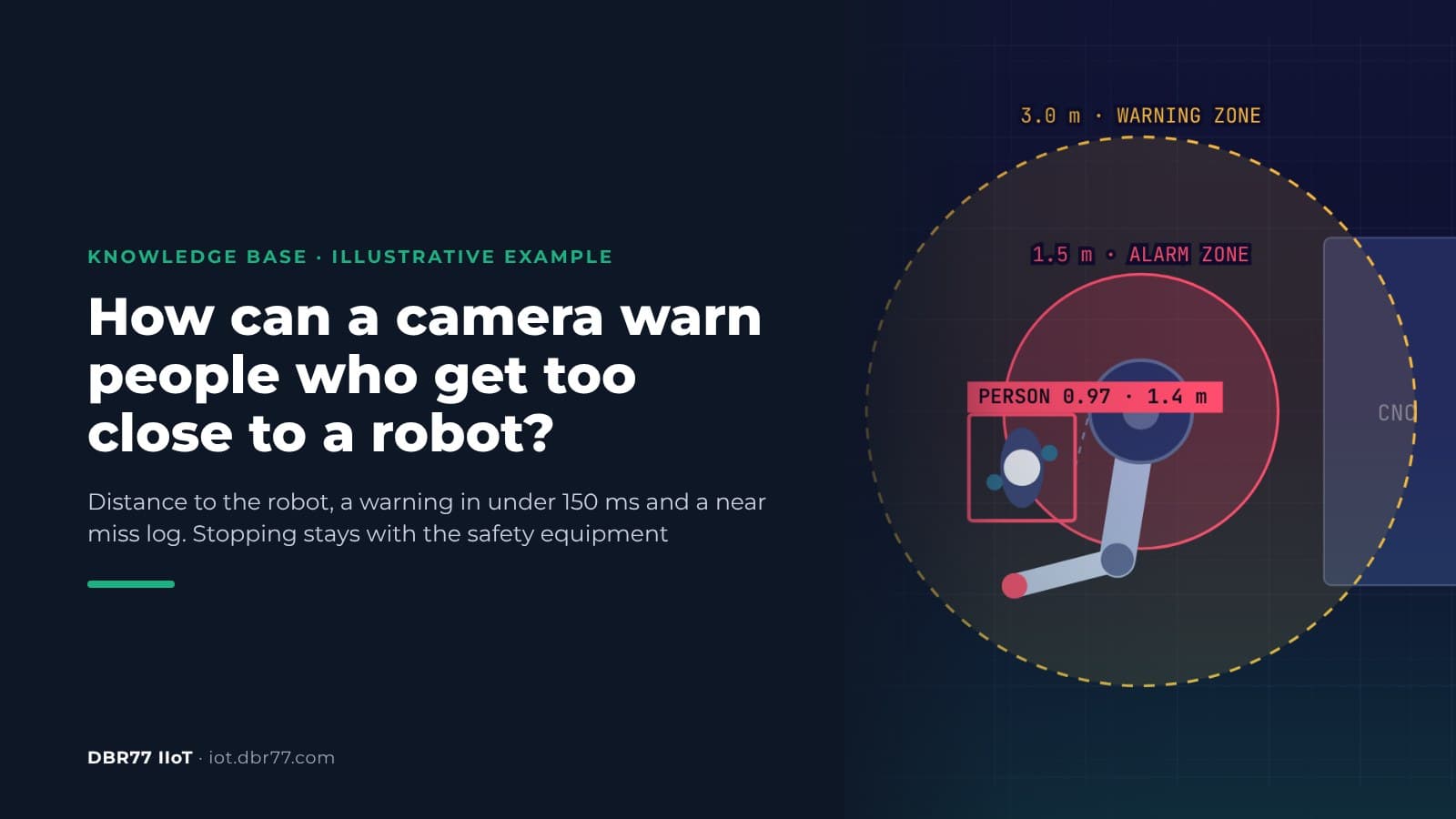
A camera can measure the distance between a person and a robot and warn the person before they get too close. In DBR77 IIoT, Vision AI watches the cell from above, warns in under 150 ms from detection when someone enters the warning zone, raises an alarm in the alarm zone and logs the event as a near miss with time and location. It does not slow down or stop the robot and sends no commands to it. Slowing and stopping stay with the certified safety equipment of the cell.
This article is part of our series on cameras in production. The other parts cover checking that every step was done in the right order and running a time study without identifying anyone.
Where people get hurt around robots
OSHA notes that many robot accidents occur during non-routine operating conditions, such as programming, maintenance, testing, setup or adjustment. During these tasks a worker may be inside the robot's working envelope.
US fatality data points the same way. A study of robot-related deaths at work found 41 robot-related fatalities in the United States between 1992 and 2017. Maintenance of the robot was mentioned in 24 of them (58.5%). Most cases (83%) involved stationary robots, and in 78% the robot struck the person while running under its own power.
What the camera does at a robot cell
The camera looks at the cell from above and measures the distance from each person to the robot. It uses two zones around the robot:
- Distance. The system detects a person and measures how far they are from the robot, image by image.
- Warning zone. When a person comes within 3.0 m, the system warns them in under 150 ms from detection.
- Alarm zone. When a person comes within 1.5 m, the system raises an alarm and logs a near miss with the time and the place in the cell.
- All clear. When the person leaves, the log records that the alarm zone and then the warning zone are clear again.
The 3.0 m and 1.5 m zones come from the demo and can be set per cell.
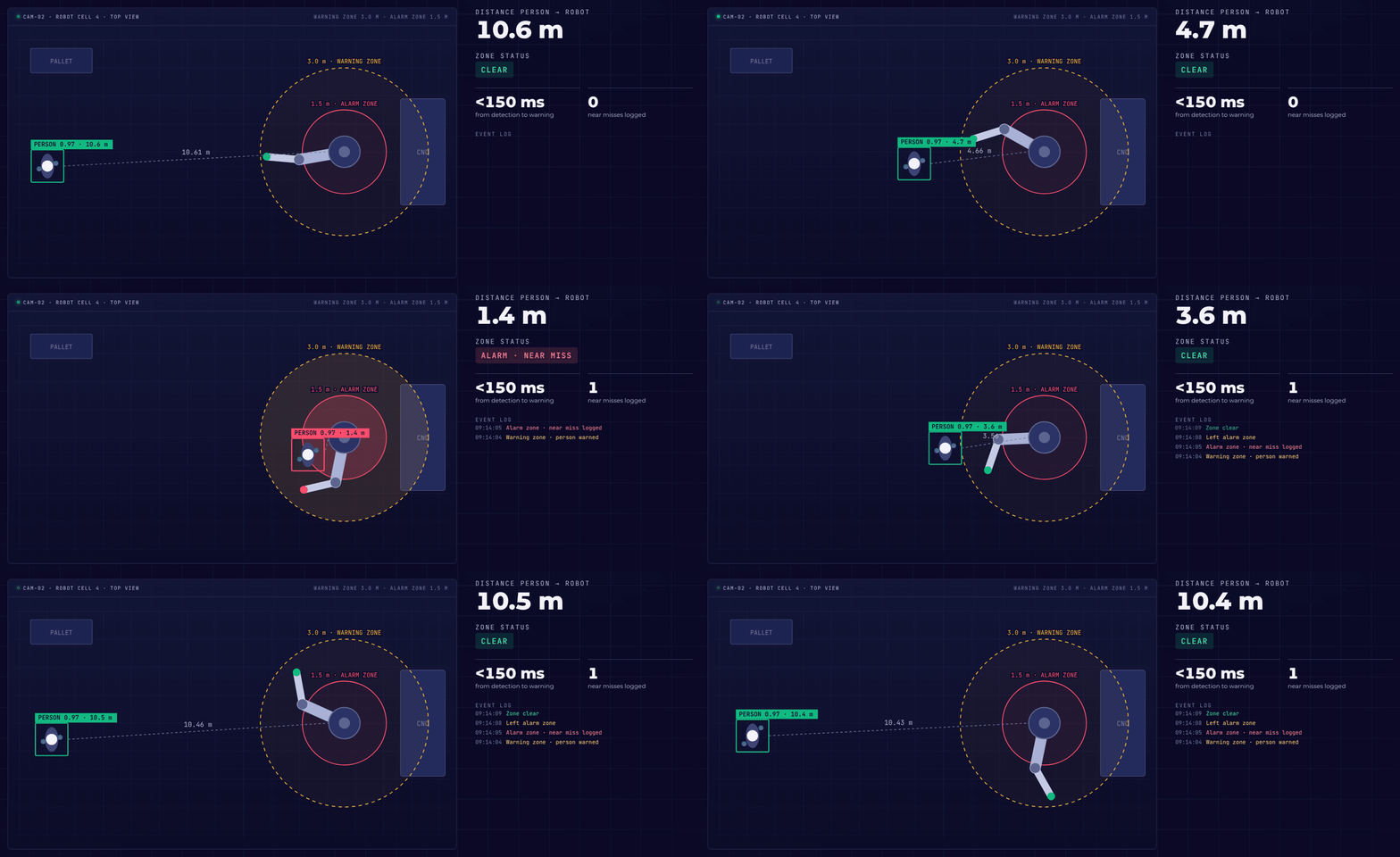
Illustrative example based on the DBR77 Vision AI presentation: the camera warns and logs a near miss. It sends no commands to the robot; slowing and stopping stay with the cell's safety equipment.
In the example, a person walks up to robot cell 4 and away again. Inside 3.0 m the status changes to a warning, inside 1.5 m to an alarm, and the near miss counter goes to 1. Vision AI sends nothing to the robot. Whether the robot slows down or stops is decided only by the cell's certified safety equipment.
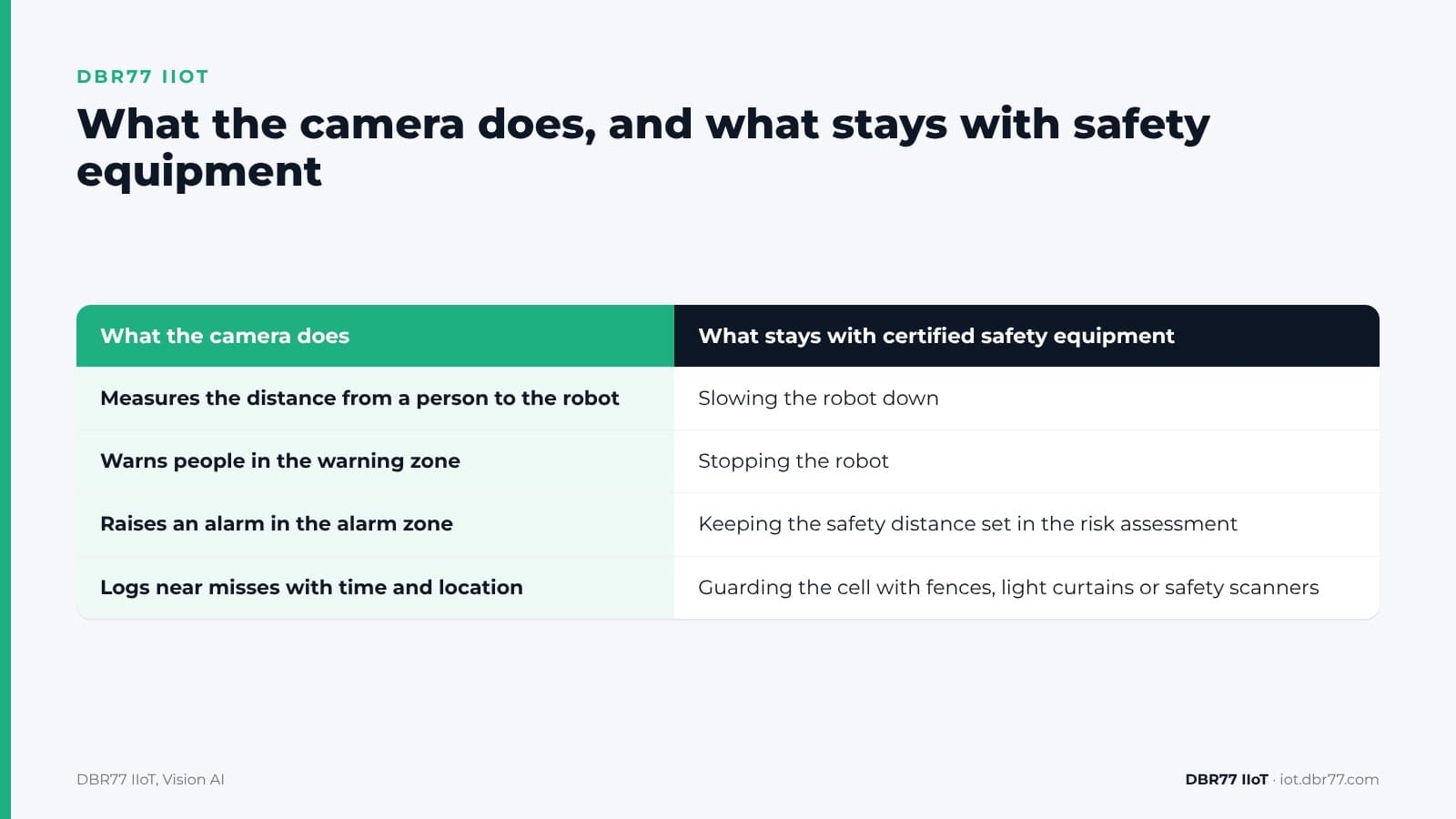
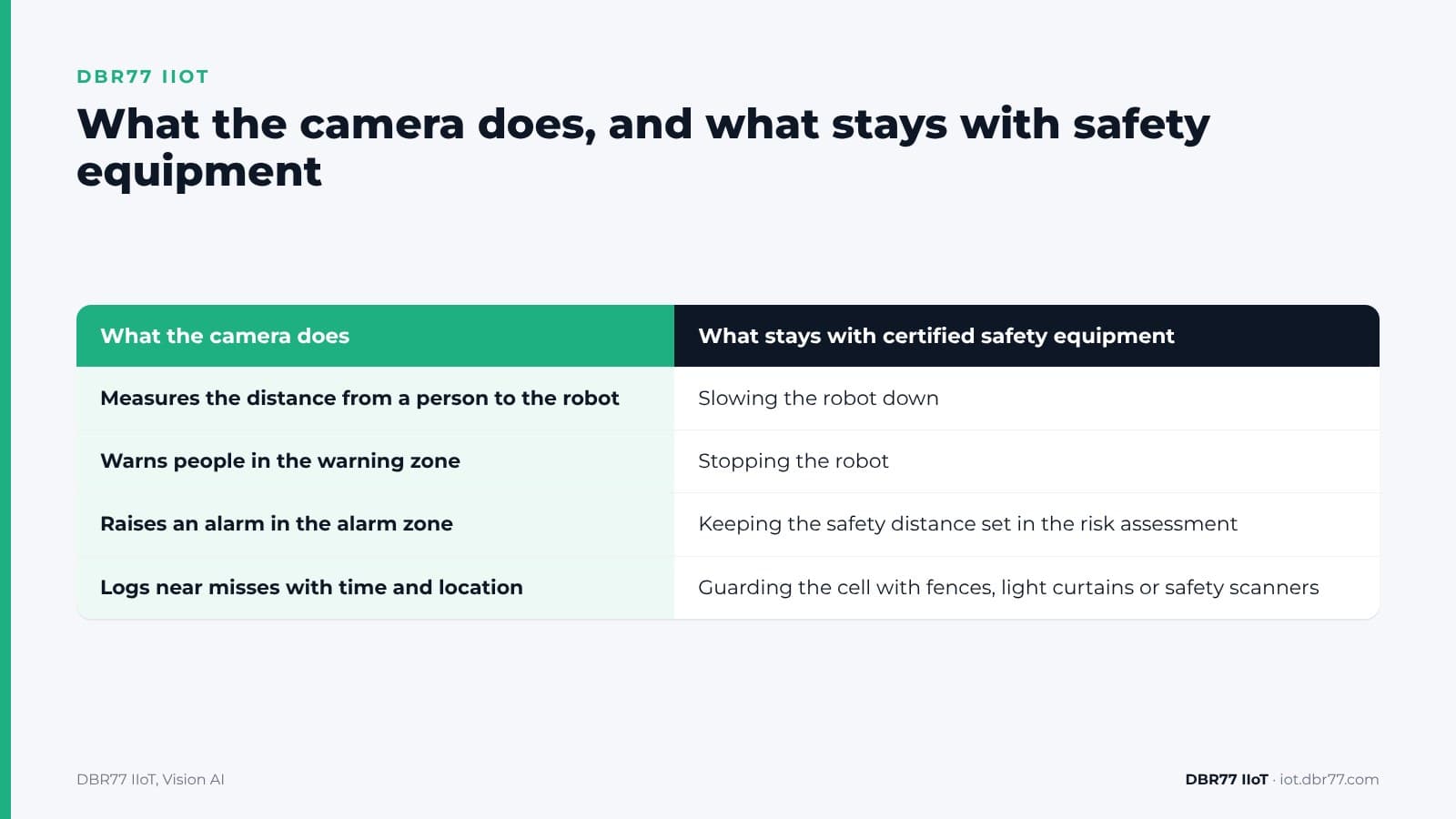
| What the camera does | What stays with certified safety equipment |
|---|---|
| Measures the distance from a person to the robot | Slowing the robot down |
| Warns people in the warning zone | Stopping the robot |
| Raises an alarm in the alarm zone | Keeping the safety distance set in the risk assessment |
| Logs near misses with time and location | Guarding the cell with fences, light curtains or safety scanners |
See what the camera would see in your cell
Send us a few photos and one or two short videos of a robot cell, taken under your photo policy. We show you what the system detects and what it misses.
Why the camera warns and does not stop the robot
Stopping a robot when a person comes near is a safety function, and standards set the requirements for it. The 2025 edition of ISO 10218-2 specifies requirements for the safety of industrial robot applications and robot cells, and it is written for robot manufacturers, integrators and users. The parts of the control system that carry out a safety function are rated by Performance Level under ISO 13849-1, and the level each function needs comes from the risk assessment of that cell.
Where a safeguard must sit is calculated too. ISO 13855 specifies requirements for the positioning and dimensioning of safeguards based on how fast a person approaches and the overall stopping time of the machine and its safeguard. The 3.0 m and 1.5 m zones in our example are warning zones and have not been calculated that way.
Cameras as protective devices are possible, but they must be proven for the job. IFA, the occupational safety institute of the German Social Accident Insurance, found that one camera measuring method it tested has not been proved suitable for safety-related applications, while other designs passed. For AI-based detection the gap is wider: IFA researchers wrote in 2022 that there are no regulations that clarify the relationship between functional safety and artificial intelligence.
That is why Vision AI stays on the warning side. Our devices only read: they never send commands to the robot or change its control system. The warning is an extra layer for people. It does not replace a fence, a light curtain, a safety scanner or a lockout procedure, and it does not count toward the safety distance.
The under 150 ms is measured from the moment the system detects a person. A person the camera does not see, because a pallet or another person blocks the view, gets no warning, and the time a person needs to react comes on top.
What near misses tell you
The National Safety Council defines a near miss as an unplanned event that doesn't result in injury or death, but could have. Reporting them depends on people noticing and writing them down. A camera logs every entry into the alarm zone with time and place, whether anyone reports it or not.
After a few weeks the log shows which side of the cell people enter from and at what time of day. Put that next to the shift plan and you see which tasks bring people into the cell. One cell where people step in during every changeover may need a different material path, a second operator panel or a change to the setup procedure. These are questions for your safety team and the cell's integrator.
The near miss count does not forecast accidents. It tells you where and when to look at the cell more closely.
Warnings only work if people trust them. Our article on why IIoT alerts fail on the shop floor shows how too many alarms teach people to ignore them, and the same applies to a warning at a robot cell.
What to settle before the first camera goes up
A camera at a robot cell touches machine safety, labor law and data protection. These are the main points; check them with your safety engineer, the cell's integrator and your data protection officer:
- Risk assessment. Add the camera to the cell's documentation as a warning for people, outside the safety functions. The safety distance and the protective equipment stay as the risk assessment set them.
- Machinery Regulation. From 20 January 2027, Regulation (EU) 2023/1230 applies to machinery in the EU; until then the Machinery Directive 2006/42/EC applies. It lists safety components with fully or partially self-evolving behaviour using machine learning approaches ensuring safety functions among the products that need a third-party conformity assessment. Vision AI as described here performs no safety function, and it is not certified as a safety component.
- Warning and response. Agree how the warning reaches people at the cell, who is notified of an alarm, and who looks at the near miss log each week.
- Your people. The camera sees people while it analyzes images, so the images are personal data in that moment, even though no video is recorded. Explain on the floor what the camera does and what the log is for. The labor law points from our time study article apply here too.
How to test it on one cell
The test follows the same path as any Vision AI check: a demo and a look at your cell, a test on a few photos and short videos under NDA, a proof of concept on one cell, and a rollout only if the results convince you.
- Camera. Any standard IP camera can be used; in the example it looks at the cell from above. Each image is analyzed in about 25 ms on a computer inside your building.
- Zones. You set the size of the warning zone and the alarm zone for each cell.
- Reaction. You decide what happens: warn, log or notify a person, without programming. The system does not slow down or stop the robot and sends it no commands.
- Cost. It is made up of the edge unit, the AI chip, the cameras and a monthly software license per unit. One unit can evaluate 1 to 40 cameras in parallel.
When a camera is the better sensor for a job, and when it is not, is covered in our article on cameras as sensors.
Where this sits in DBR77 IIoT
Vision AI is the camera layer of DBR77 IIoT. The same principles apply across the system:
- Our devices only read. They never send commands to your machines and do not change the control system.
- Images are analyzed on site and video is not recorded.
- Vision AI runs on DBR77 Vector, our own industrial AI, which can be deployed on your servers. Your data trains no model without written consent, and DBR77 is certified to ISO/IEC 27001:2022.
- Vision AI events land in IRIS, next to the machine data.
FAQ
Can the camera stop the robot?
No. Vision AI warns people, raises an alarm and logs near misses. It sends no commands to the robot. Slowing and stopping stay with the certified safety equipment of the cell.
Does it replace a light curtain or a safety scanner?
No. It adds a warning for people on top of the existing guarding. The safety distance and the protective equipment stay as the risk assessment set them.
What does "under 150 ms" include?
The time from the moment the system detects a person in the zone to the warning. It does not cover a person the camera cannot see, and the person's own reaction time comes on top.
Can we set our own zones?
Yes. The 3.0 m warning zone and 1.5 m alarm zone come from the demo. You set the zones per cell.
What does the near miss log hold?
The time, the zone and the place in the cell where the person was. The log is for finding patterns at the cell, such as where and when people step in.
Conclusion
Pick one robot cell where people often step in during setup, changeover or material handling. Before the test, write down where the warning zone and alarm zone should be, who should get the warning, and who will look at the near miss log. Then check with the cell's integrator that the camera is documented as a warning only, outside the safety functions. That gives you the basis for a first test on photos and short videos from the cell.
Bring one robot cell to the demo
Show us the cell, the paths people take and where they step in. We show you the zones and the near miss log on a similar example and what it would need in your plant.
Sources
- OSHA, Robotics
- L.A. Layne, Robot-related fatalities at work in the United States, 1992 to 2017, American Journal of Industrial Medicine, 2023
- ISO, ISO 10218-2:2025 Robotics, Safety requirements, Part 2: Industrial robot applications and robot cells, 2025
- ISO, ISO 13855:2024 Safety of machinery, Positioning of safeguards with respect to the approach of the human body, 2024
- IFA (DGUV), Vision-based protective devices, project IFA 5100
- A. Steimers, M. Schneider, Sources of Risk of AI Systems, International Journal of Environmental Research and Public Health, 2022
- European Union, Regulation (EU) 2023/1230 on machinery, 2023
- National Safety Council, Near Miss Reporting
- DBR77, DBR77 IIoT, 2026
- DBR77, IIoT and Vision AI customer presentation, 2026