How Can a Camera Run a Time Study Without Identifying Anyone?
DBR77 Team · Published
A camera can run a time study by counting how much of the shift each station spends on value-adding work. In DBR77 IIoT, Vision AI treats busy hands at a station as work and empty hands as waiting. It also counts the people in an area, the parts completed and the parts sent to scrap, and it measures cycle times. It does not recognize faces, names nobody, and records no video. The result is a working share per station, which shows where time is lost in the process.
This article is part of our series on cameras in assembly. The other parts cover checking that every step was done in the right order and checking fasteners against a reference.
Why a manual time study gives only part of the picture
A classic time study needs an observer with a stopwatch or a work sampling sheet at the station. That limits it to a few hours or a few days, and to the shifts someone can cover. The International Labour Office handbook Introduction to Work Study sets the rule for doing it well: it is the work, and not the worker, that is being studied, and workers' representatives should be kept fully informed of what is being studied and why.
Being watched also changes how people work. A systematic review of the Hawthorne effect concludes that consequences of research participation for the behaviors being investigated do exist, although little is known for certain about when they occur and how large they are. In practice, the study can show a good hour at the station, while the waiting that happens on the night shift or when a part runs short stays out of the figures.
What a camera counts at a station
The camera looks at the area from above and sorts what it sees into a few categories:
- Work. A person at a station with busy hands, for example fitting a part, counts as working time for that station.
- Waiting. A person at the station with empty hands counts as idle time, and the event log records it, for example "Station 2 · idle, hands empty".
- Transit. Someone who walks through the area is counted as present in the area, but their walk is not booked to any station.
- Output. Each completed part is counted, and a part that goes to the scrap bin is counted as scrap.
From these counts the system shows the value-adding share for the whole area, the working share per station, the parts completed, the parts to scrap and the cycle times.
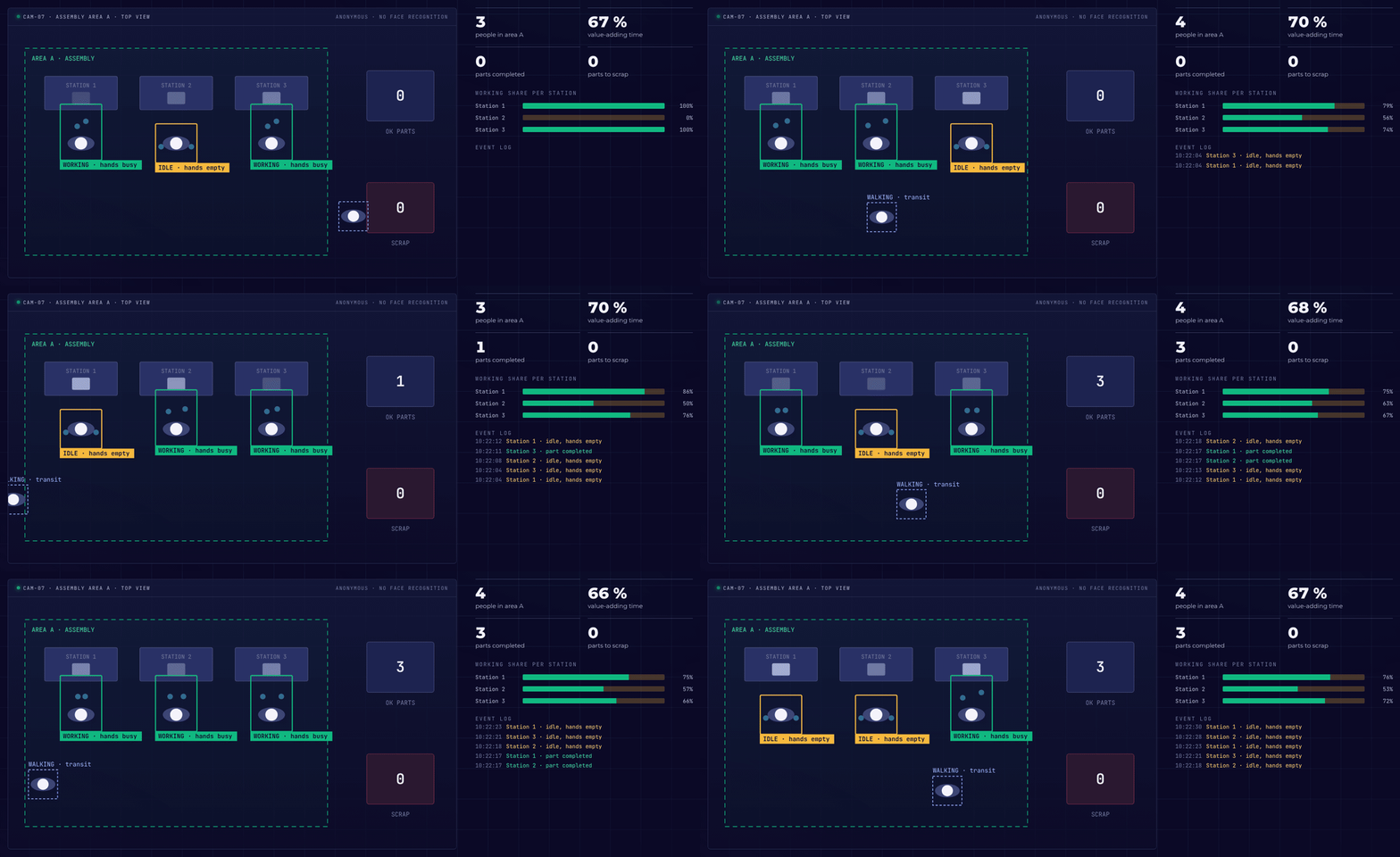
Illustrative example from the DBR77 Vision AI presentation: busy hands count as work, empty hands as waiting, and a walk through the area is not booked to any station.
In the example, three people work at three stations in assembly area A while a fourth walks through. Station 2 waits more often than the others, and its bar for working share stays lower.
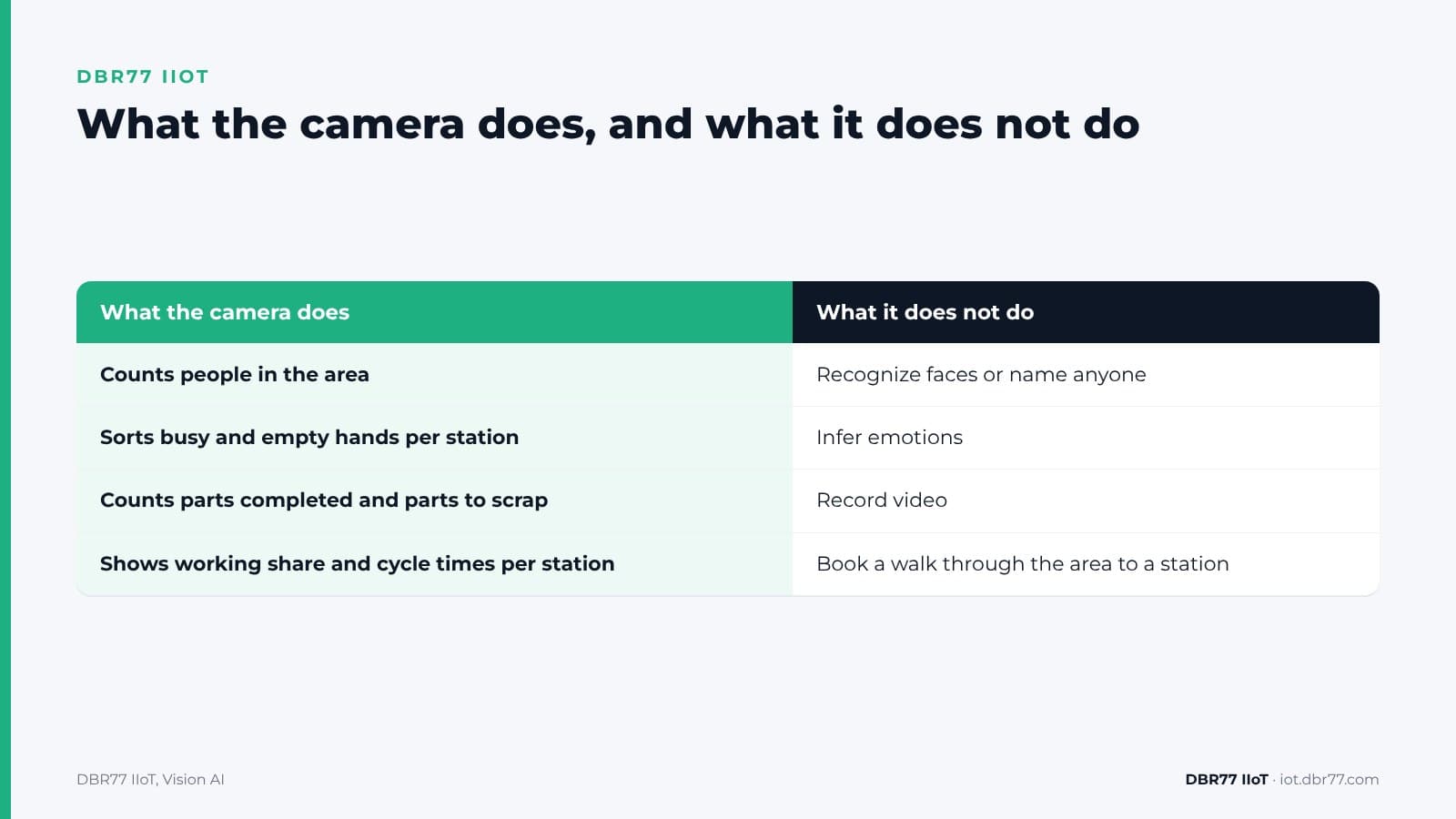
| What the camera does | What it does not do |
|---|---|
| Counts people in the area | Recognize faces or name anyone |
| Sorts busy and empty hands per station | Infer emotions |
| Counts parts completed and parts to scrap | Record video |
| Shows working share and cycle times per station | Book a walk through the area to a station |
See the working share of your own area
Send us a few photos and one or two short videos of the area, taken under your photo policy. We show you what the system counts and what it misses.
What the working share tells you, and what it does not
A low working share at a station is a signal about the process. Lean practice defines waste as any activity that consumes resources but creates no value for the customer, and lists among the classic wastes operators standing idle as machines cycle, equipment fails, needed parts fail to arrive, as well as movement such as looking for parts, tools or documents.
Empty hands at station 2 usually point to one of these causes: parts arrive late, the station waits for the one before it, or the work is unevenly split across stations. These are questions for line balancing, material supply and work design.
Not every non-value-adding minute can go. The same lexicon calls some waste unavoidable with current technologies and production assets, for example inspecting welds to make sure they are safe. The working share shows where to look, and the team on the floor explains what happens there.
The figures sit next to your machine data. Our article on live OEE compared with OEE from a spreadsheet shows how manual recording hides short stops, and the same applies to waiting time at manual stations.
No faces, no names: what is analyzed and what is kept
The camera layer is built to measure the process:
- No face recognition. The system detects people and hands, not identities.
- No video recording. Images are analyzed on a computer inside your building and are not recorded. What is kept are counts, shares, cycle times and events.
- Station, not person. Results are shown per station and per area.
Two points still need care. The camera sees people at the moment of analysis, so the images are personal data in that moment, even when nothing is stored. And at a station with one or two people, a station figure can point to a person. Agree in advance how results are grouped, for example per station and shift, and who sees them.
How processing on site differs from sending images to the cloud is covered in our article on edge versus cloud in manufacturing.
What to settle before the first camera goes up
A camera that sorts work and waiting at a station touches labor law and AI rules. These are the main points; check them with your legal team and data protection officer for your site:
- EU AI Act. Regulation (EU) 2024/1689 lists AI systems intended to be used to monitor and evaluate the performance and behaviour of persons in work relationships among high-risk uses. The same regulation prohibits inferring emotions in the workplace, except for medical or safety reasons. The time study described here does not infer emotions. Under the Digital Omnibus on AI, Regulation (EU) 2026/1744, the obligations for these high-risk uses apply from 2 December 2027. Whether a given setup falls into that category depends on how it is configured and used.
- Germany. Under section 87(1) no. 6 of the Works Constitution Act, the works council has a right of co-determination on technical devices designed to monitor the behavior or performance of employees. Plan a works agreement before the pilot.
- Poland. The Labour Code offers two possible bases. Article 22(2) covers video monitoring and allows it when it is necessary, among other purposes, for production control. Article 22(3) section 4 applies the monitoring rules to other forms of monitoring when they are necessary to organize work so that working time is fully used. Which basis fits a camera that records no video is a question for your lawyer. Under both, employees must be informed at least two weeks before monitoring starts and the monitored area must be marked. Article 22(2) also excludes sanitary rooms, changing rooms, canteens, smoking rooms and rooms made available to the trade union.
- Your people. Explain on the floor what the camera counts, what it does not, and what the figures are used for, before the first day. Our article on what to do when operators do not trust the signals yet covers the first weeks.
How to test it on one area
The test follows the same path as any Vision AI check: a demo and a look at your area, a test on a few photos and short videos under NDA, a proof of concept on one area, and a rollout only if the results convince you.
- Camera. Any standard IP camera can be used; in the example it looks at the area from above. Each image is analyzed in about 25 ms on a computer inside your building.
- Definitions. An engineer describes in words what to look for at each station, and the team can add new checks during operation. There is no dataset to collect and no training project.
- Reaction. You decide what happens with the figures: count, log, warn or notify a person, without programming. The system does not stop machines; a person decides.
- Cost. It is made up of the edge unit, the AI chip, the cameras and a monthly software license per unit. One unit can evaluate 1 to 40 cameras in parallel.
When a camera is the better sensor for a job, and when it is not, is covered in our article on cameras as sensors.
Where this sits in DBR77 IIoT
Vision AI is the camera layer of DBR77 IIoT. The same principles apply across the system:
- Our devices only read. They never send commands to your machines and do not change the control system.
- Images are analyzed on site and video is not recorded.
- Vision AI runs on DBR77 Vector, our own industrial AI, which can be deployed on your servers. Your data trains no model without written consent, and DBR77 is certified to ISO/IEC 27001:2022.
- Vision AI events land in IRIS, next to the machine data.
FAQ
Does the camera know who is working?
No. It detects people and hands and counts them per station and area. It does not recognize faces and does not name anyone.
Is idle time counted against a worker?
The system shows working share per station and area. Empty hands usually mean the station waits for parts, for the previous station or for a machine, and those are process questions. Agree with your team and their representatives how the figures are grouped and used before the start.
Does walking through the area count as work?
No. A person walking through is counted as present in the area, but the walk is not booked to any station.
Do we need the works council or employees to agree?
In Germany the works council has a right of co-determination on technical devices designed to monitor behavior or performance. In Poland the Labour Code requires a stated purpose, information to employees at least two weeks in advance and marked areas. Check the rules for your site with your legal team.
Can it replace a classic time study?
It covers whole shifts instead of a few observed hours and shows where time is lost per station. Breaking a task into motion elements to plan a new process remains a job for your industrial engineers.
Conclusion
Pick one manual area where output varies from shift to shift and nobody can say why. Before the test, write down what counts as work at each station and which figures you want: working share, cycle time, scrap. Then tell the team and, where there is one, the works council what the camera will count and what it will not. That gives you the basis for a first test on photos and short videos from the area.
Bring one manual area to the demo
Show us the area, the stations and what counts as work there. We show you a time study on a similar example and what it would need in your plant.
Sources
- International Labour Office, Introduction to Work Study, 4th revised edition, 1992
- J. McCambridge, J. Witton, D. Elbourne, Systematic review of the Hawthorne effect, Journal of Clinical Epidemiology, 2014
- Lean Enterprise Institute, Lexicon: Waste
- Lean Enterprise Institute, Lexicon: Seven Wastes
- European Union, Regulation (EU) 2024/1689 (Artificial Intelligence Act), 2024
- European Union, Regulation (EU) 2026/1744 (Digital Omnibus on AI), 2026
- Federal Ministry of Justice, Works Constitution Act, section 87
- Sejm of the Republic of Poland, Labour Code, consolidated text, Journal of Laws 2026 item 1245, 2026
- DBR77, DBR77 IIoT, 2026
- DBR77, IIoT and Vision AI customer presentation, 2026